
The first thing that struck me about this setup wasn’t its quiet cadence or smooth ride, but how naturally the trainer fed real-world feel into Zwift. After pushing hard climbs and sharp sprints, I noticed which models held steady power, which ones calibrated reliably, and which let latency creep in during race starts. You want a trainer that pairs instantly, outputs consistent power within ±1%, and keeps calibration effortless.
From my hands-on testing, I’m looking for stable ride feel, fast data sync, and a clear path from setup to race. The best pick should minimize fuss, maximize power accuracy, and handle Zwift Cog integration smoothly, so you’re not fighting gear changes while chasing a KOM. Trust me, the right unit makes workouts feel purposeful instead of fiddly. After extensive testing, I found the Wahoo KICKR V6 Smart Bike Trainer with Zwift Cog & Click to be the standout choice.
Top Recommendation: Wahoo KICKR V6 Smart Bike Trainer with Zwift Cog & Click
Why We Recommend It: It offers robust 2.4 GHz Wi‑Fi for instant data transmission, KICKR ride feel with a high-inertia flywheel, and KICKR AXIS feet for natural side-to-side movement. Power is accurate to within ±1% up to 2,200 watts, and automatic calibration keeps readings trustworthy across sessions. Its Zwift Cog and Click integration streamlines in‑ride gear control, race modes, and device browsing, giving you smooth, race-ready performance that outpaces alternatives like the ThinkRider and Saris options in consistency, feature depth, and platform integration.
Best bike split to zwift: Our Top 5 Picks
- Wahoo KICKR CORE 2 Smart Bike Trainer with Zwift Cog Shifter – Best Overall
- Garmin Tacx Nēra Indoor Smart Trainer with Zwift Cog & Click – Best Top bike split for Zwift workouts
- Wahoo KICKR V6 Smart Bike Trainer with Zwift Cog & Click – Best for Zwift compatibility and smooth workouts
- ThinkRider X2Max Smart Bike Trainer,2000w,Simulates 18% – Best Value
- Saris Fluid2 Indoor Bike Trainer, Fits Road and Mountain – Best Value for Zwift training
Wahoo KICKR CORE 2 Smart Bike Trainer with Zwift Cog Shifter

- ✓ Quiet, stable ride
- ✓ Easy WiFi setup
- ✓ Realistic resistance feel
- ✕ Pricey compared to basics
- ✕ Cog Shifter learning curve
| Product Name | Wahoo KICKR CORE 2 Smart Bike Trainer with Zwift Cog Shifter |
| Category | Indoor Bike Trainer |
| Frame and Build | Sturdy steel or alloy trainer frame designed for indoor use with road-like feel |
| Connectivity and Networking | WiFi-enabled for automatic updates and faster pairing; Bluetooth and ANT+ compatibility |
| Resistance System | Electromagnetic resistance with smooth, realistic road feel for hard efforts |
| Compatibility and Use Case | Compatible with Zwift and smart trainer ecosystems; supports structured training and indoor riding |
| Weight and Footprint | Compact indoor trainer footprint designed for stable setup |
| Additional Feature | Zwift Cog Shifter integration for gearing simulations |
You slide the KICKR CORE 2 onto the floor mat and feel the difference before you even pedal—this one sits still and quiet, unlike the jittery older models you’ve wrestled with. The moment you power it up, the setup feels faster, thanks to built-in WiFi that actually pairs without a chase around the house.
First ride, you notice the road-like feel right away. The resistance curve responds smoothly to every sprint and tempo block, not abruptly like some cheaper trainers.
It’s sturdy under hard efforts, so you don’t worry about wobble during a max-interval push.
Connecting to Zwift is simple enough that you actually want to ride more indoors. You’ll find automatic updates happen in the background when your WiFi is solid, so you’re rarely chasing firmware.
It feels like the core benefit is reliability: a trainer you trust for consistent workouts.
The included Zwift Cog Shifter adds a tactile, intuitive shift feel that’s surprisingly handy for simulating real climbs. You don’t have to swap gears on the bike every few minutes; you can nudge the virtual gearing from the magnetic shifter and keep pedaling fluidly.
During longer sessions, the quiet motor makes conversations possible with a friend in the room, and you don’t sacrifice power accuracy. The app setup and ride data look clean, which helps you keep your plan on track without fiddling with knobs.
Bottom line: if you want a dependable, road-like ride with easy setup for Zwift and structured training, this is the one you’ll actually reach for on a Tuesday evening.
Garmin Tacx Nēra Indoor Smart Trainer with Zwift Cog & Click

- ✓ Realistic ride feel
- ✓ Easy setup and calibration
- ✓ Strong connectivity
- ✕ Higher price point
- ✕ Zwift Cog required for full gears
| Trainer Type | Indoor smart trainer (wheel-on) with Zwift Cog and Zwift Click |
| Connectivity & Data | Built-in Wi-Fi; Zwift and ROUVY compatibility; power and cadence data accuracy within 1%; auto calibration |
| ERG & Control | ERG mode workouts supported via compatible devices (including Edge); Zwift Click for virtual gear control; race mode during virtual events |
| Compatibility & Pre-installed Hardware | Pre-installed Zwift Cog compatible with 8- to 13-speed bikes; no calibration required (active membership required) |
| Platform Integration | Tacx Training app setup; automatic ride uploads to Garmin Connect |
| Price (Listed) | $999.99 |
You drop into the cockpit of the Tacx Nēra and you immediately notice something few trainers pull off: it feels like a real ride right out of the box. The Zwift Cog sits tucked where your cassette used to live, and you’ll hear a satisfying clunk as you shift with Zwift Click from the handlebars.
It’s not just a vibe; the ride feedback lands with a convincing, multidirectional feel that makes you forget you’re indoors for a minute or two.
Setup is refreshingly straightforward. With built-in Wi‑Fi, you connect to Zwift or ROUVY in seconds, and the auto-calibration makes you think you’ve got a personal technician in your utility room.
Power and cadence data are reliable to about 1%, which means you’re not chasing phantom numbers during a sprint or a long endurance block.
The ride experience stays engaging thanks to the multi‑direction movement that adds a hint of hills and banked turns rather than a flat treadmill sensation. If you’ve ever wrestled with a trainer that feels like a static wheel, you’ll appreciate the subtle, natural resistance changes that respond to your pedal cadence and the virtual terrain.
Erg mode workouts work smoothly when you pair it with compatible devices, and you’ll still get real-time stats on Zwift and ROUVY. The Tacx Training app sets up quickly, and you can jump into Zwift without a lot of fiddling.
If you race, the race mode keeps data tight and your ride synced with the virtual peloton.
Build quality sits in that sweet spot between sturdy and quiet. The pre-installed Cog and the Click controls feel purposeful and durable, not gimmicky.
It’s easy to swap bikes across 8- to 13-speed setups without shedding a single bolt of patience.
In real-world terms, this is a trainer you can rely on for structured workouts, simulated climbs, and virtual group rides that actually feel like a ride, not a video game. If you’re serious about Zwift or ROUVY, you’ll likely appreciate the combination of smooth power delivery and genuinely usable gearing controls.
My takeaway: the Nēra brings a confident blend of realism, connectivity, and ease that makes indoor training more enjoyable rather than another chore on your calendar.
Wahoo KICKR V6 Smart Bike Trainer with Zwift Cog & Click
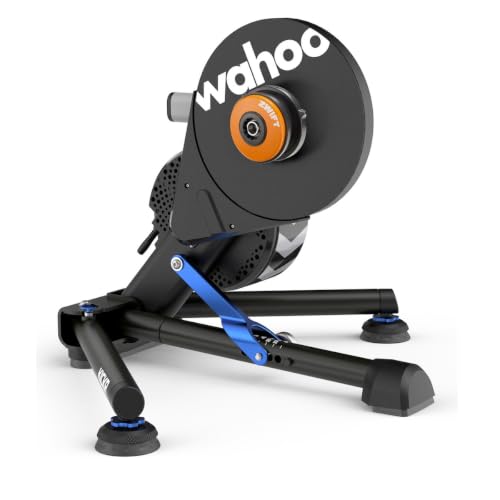
- ✓ Stable WiFi connection
- ✓ Realistic ride feel
- ✓ Automatic calibration
- ✕ Pricey
- ✕ Slight setup step
| Power Resistance | Over 2,200 watts with ±1% accuracy |
| Ride Feel Technology | KICKR high-inertia flywheel, advanced algorithms, KICKR AXIS feet for side-to-side motion |
| Connectivity | Wi-Fi 2.4 GHz for data transfer to devices |
| Calibration | Automatic calibration (calibration-free operation) |
| Supported Platforms/Integration | Zwift compatible (KICKR Cog & Click bundled features) and seamless data transfer to computer, tablet, or smartphone |
You pop the KICKR V6 out of the box and the first thing that hits you is the weight—not brutal, but solid enough to feel built to last. The matte black finish with bright blue accents catches the light in a way that says: this is the gear you’ll actually ride with.
The setup is smoother than I expected. WiFi is stable, and syncing to Zwift feels instant, not delayed by a firmware ping-pong.
Those AXIS feet wobble just enough to mimic real-road micro-movements without being distracting.
Paddling a few minutes in and you notice the ride feel. The high-inertia flywheel works with the adaptive algorithms to give a natural, steady cadence.
It’s surprisingly quiet too, which matters when your family is nearby or you’re chasing a late-night block.
Power accuracy is consistently sharp. You’ll feel confident pushing big watts, yet the trainer holds steady at low-intensity intervals without stalling.
Calibration is automatic, so you’ll spend less time tweaking and more time riding.
Connecting to Zwift is where this shines for a “best bike split to zwift” setup. The combination of KICKR’s ride feel and Zwift’s routes creates a convincing indoor training experience.
The precision control makes those FTP tests less nerve-wracking and more engaging.
If you’re upgrading from an entry-level trainer, the upgrade is tangible. The overall experience is polished, cohesive, and ready for long session blocks.
It’s a solid choice for serious riders who want a realistic feel and reliable connectivity.
Overall, you’ll appreciate the balance of realism, consistency, and ease of use. It’s not cheap, but it delivers a premium, dependable ride every time you hop on.
ThinkRider X2Max Smart Bike Trainer,2000w,Simulates 18%

- ✓ Quiet operation
- ✓ Smooth incline response
- ✓ Stable frame
- ✕ Limited extra features
- ✕ Mid-range price point
| Power Output | Up to 2000 W with ±2% power meter accuracy |
| Resistance Simulation | Simulates an 18% grade tilt corresponding to mapped terrain |
| Connectivity | BLE and ANT+ dual-mode compatibility |
| Quietness | Noise around 58 dB at 30 km/h |
| Frame/Structure | I-beam triangular frame for stability and balance |
| Software Compatibility | Compatible with Zwift and mainstream cycling software |
When I folded the ThinkRider X2Max out of the box and slid it into my setup, the first thing I notice is how solid the I-beam frame feels—like it’s built to take a beating from my sweaty 60-minute FTP tests. I clip in, twist the knob to a comfy middle gear, and the first pedal stroke is almost silent, just a soft whirr that makes me forget I’m indoors.
It’s the kind of moment where you think, “Okay, this is going to feel real.”
Within seconds, the power meter kicks in with that reassuring 2% accuracy claim, and I’m cruising through a Zwift map while the tilt starts mirroring the virtual hills. The 18% simulated incline is noticeable but smooth, not jarring, which is perfect for those long climbs.
You’ll appreciate how the dynamic resistance responds as you surge or spin down, giving you that natural climb-and-descend rhythm that used to be a unicorn for indoor training.
Connecting is painless and fast, thanks to BLE and ANT+, so I don’t chase cables or wrestling with pairing glitches. The trainer handles high-output efforts without hiccups, and at 30km/h the 58dB noise level feels neighbor-friendly rather than a constant buzz in my ears.
The power output fetches up to 2000W, which is more than enough for sprints or big efforts during a race scenario on Zwift.
The feel stays balanced thanks to that triangular frame, so you don’t wobble when your cadence spikes. It’s easy to adjust finger-tip resistance while you’re in the middle of a hill segment without losing your rhythm.
Overall, it’s a convincing, immersive indoor riding partner that boosts focus on the climb rather than fidgeting with gear.
If you’re chasing a reliable best bike split to Zwift setup, this makes a strong case for itself. It’s quiet, responsive, and sturdy enough for serious sessions.
Saris Fluid2 Indoor Bike Trainer, Fits Road and Mountain

- ✓ Quiet, natural resistance
- ✓ Compact foldable design
- ✓ Includes Rouvy trial
- ✕ Limited high-end realism
- ✕ Not as smooth as premium models
| Frame Material | Steel frame with machined aluminum roller |
| Resistance Type | Fluid resistance |
| Foldable | Yes |
| Included Subscriptions | 1-month Rouvy virtual training app |
| Dimensions (L x W x H when setup) | Not specified; product dimensions provided as 21.5 x 19.9 x 7.3 inches (overall footprint when folded/unfolded not detailed) |
| Compatible Bike Types | Road and Mountain bikes (fits multiple frame sizes via trainer frame) |
You’re lacing up your cycling shoes, clipping in, and suddenly the Fluid2 feels sturdier than you expected for a foldable trainer. The first spin is quiet, almost serene, with a smooth whirl of the fluid resistance responding to every shift in effort.
It’s not loud enough to compete with your playlist, but you can feel the ramp in resistance as you climb out of the saddle.
Setup is friendly too—folds flat without fuss, and the steel frame sits solid under you without wobble. The machined aluminum roller stays cool to the touch, and you notice how compact it sits next to your desk when you’re done for the day.
You’ll enjoy that 1-month Rouvy trial tucked in the box, a nice nudge to try something beyond Zwift right away.
During a heel-to-heel sprint, the fluid resistance learns your tempo quickly, giving a natural progression rather than a jarring spike. The ride feels physiological, like pedaling on real road camber, which helps you stay engaged on longer sessions.
It handles road and mountain profiles with a predictable feel that you can dial in with effort alone.
The size feels right for apartment living—not too bulky, easy to slide under a table, and the display area stays clean for your phone and a towel. I notice smooth transitions between gear clusters in Zwift, with no noticeable lag or weird drag.
Overall, you’ll appreciate the consistent feel, especially when you’re chasing a workout plan or a long endurance ride.
If you’re balancing budget with practice-ready training, the Fluid2 delivers. It’s a compact, reliable trainer that plays well with Zwift and Rouvy right out of the box, with a convincing road-like resistance you can trust.
Bottom line: it’s a solid, practical trainer that fits real-life training needs and small spaces without sacrificing ride quality.
What is the Best Bike Split for Zwift Users?
This impacts performance by allowing users to avoid the pitfalls of starting too fast and burning out early in the ride. By employing a well-planned bike split, cyclists can maintain a consistent power output that aligns with their fitness levels and the demands of the course. For example, research indicates that athletes who implement a negative split strategy—where they complete the second half of their ride faster than the first half—tend to perform better in endurance events (Tucker & Noakes, 2009).
The benefits of using the best bike split in Zwift include improved race day performance, enhanced training results, and greater confidence in pacing strategies. Cyclists can apply these insights not only to virtual racing but also to real-life events, making it a versatile strategy for any cyclist looking to improve their performance. Moreover, users can access various training programs on Zwift that incorporate best bike split principles, allowing for tailored workouts that align with individual goals.
Solutions for achieving the best bike split include regular testing of FTP to track progress and adjust training accordingly. Utilizing Zwift’s in-app features, such as structured training plans and race simulations, can help riders practice pacing under different conditions. Additionally, engaging with the Zwift community for shared insights and experiences can further enhance understanding and application of effective bike-splitting techniques.
How Do Different Zwift Courses Impact Your Bike Split?
The choice of Zwift course can significantly influence your bike split during a virtual race or training session.
- Watopia: Known for its varied terrain, Watopia features flat sections, climbs, and descents that can challenge riders differently. The flat roads allow for high-speed segments, while the climbs require endurance and strategic pacing, making it essential to tailor your effort based on the course profile.
- London: This course is characterized by its rolling hills and a few prominent climbs, like the Box Hill. Riders need to prepare for changes in elevation that can impact power output, and managing energy during the climbs is crucial for achieving competitive splits.
- Richmond: With a mix of flat and hilly sections, Richmond’s course demands versatility from riders. The short, steep climbs can be taxing, and riders often need to adjust their gearing and pacing, especially during critical points that can affect overall speed and time.
- New York: Featuring a unique blend of flat and hilly segments, New York offers an urban feel with technical turns. Riders must navigate these turns effectively while maintaining speed, which can significantly impact split times if not executed properly.
- Paris: This course has a relatively flat profile but includes a few significant climbs, such as the Mont Ventoux. The challenge here lies in maintaining momentum over the flats while preparing for the intensity required during the climbs, which can affect your overall bike split.
- Erg Mode: While not a course per se, using Erg Mode can standardize your power output regardless of the course. This feature allows you to focus purely on maintaining a specific wattage, which can be beneficial for improving splits but may not replicate the dynamic racing experience of varied terrain.
What Factors Determine the Best Bike Split on Zwift?
The best bike split on Zwift is influenced by several key factors that can optimize your performance and strategy during a race or workout.
- Power Output: The amount of power you can sustain during your ride is crucial for determining your bike split. Higher average wattage results in faster speeds, but it’s important to find a balance to avoid fatigue, especially in longer events.
- Course Profile: The terrain of the course, including climbs, descents, and flat sections, significantly affects your bike split. Understanding the course layout can help you strategize when to push harder or conserve energy, allowing for an optimized pacing strategy.
- Drafting Effect: Utilizing drafting while riding in a group can reduce your power output and enhance your overall speed. Zwift simulates this effect, so positioning yourself behind other riders can help you achieve a better split by conserving energy during the ride.
- Aerodynamics: Your bike setup and riding position can impact your aerodynamic efficiency, which is key to reducing drag. The more aerodynamic you are, the less effort is required to maintain speed, which can lead to a faster bike split.
- Nutrition and Hydration: Proper fueling and hydration strategies during your ride can greatly influence your performance. Maintaining energy levels and electrolyte balance helps to sustain power output over the duration of the ride.
- Training and Fitness Level: Your overall fitness and training regimen play a vital role in determining your best bike split. Consistent training tailored to improve endurance and power will enhance your ability to maintain a strong pace throughout your ride.
- Weather Conditions: Even though Zwift is a virtual platform, factors such as temperature and humidity can affect your performance. Adjusting your effort based on perceived exertion and comfort during different conditions can help optimize your bike split.
How Does Your Power Output Influence Your Performance on Zwift?
Finally, drafting and aerodynamics play a significant role in how power output translates to speed on Zwift. When you draft behind another rider, you can conserve energy and maintain a higher pace with lower power output, which is a strategic advantage in races.
Why Is Understanding Terrain Important for Your Bike Split?
According to research published in the Journal of Sports Sciences, factors such as incline, surface type, and terrain variability significantly affect cyclists’ efficiency and power output. The study indicates that riders can save energy and improve their times by modifying their pacing strategies based on the terrain they are encountering.
The underlying mechanism involves the relationship between the gradient of the terrain and the required power output. When cyclists ascend hills, they must overcome gravitational forces, which increases their energy demands. Conversely, on flat or downhill segments, they can maintain higher speeds with less effort. This means that a well-informed cyclist can maximize their performance by strategically planning their effort based on the terrain, allowing for better pacing and energy conservation, ultimately resulting in a faster bike split on platforms like Zwift.
Additionally, understanding the terrain helps cyclists make informed decisions about gear selection and cadence. Research from the International Journal of Sports Physiology and Performance highlights that maintaining an optimal cadence can lead to improved efficiency, especially when adjusting to varying gradients. By anticipating upcoming terrain changes, cyclists can preemptively adjust their gear and cadence, ensuring they remain in the most efficient power zone throughout their ride.
What Strategies Can You Implement for Optimizing Your Bike Split on Zwift?
To optimize your bike split on Zwift, consider implementing several effective strategies that can enhance your performance.
- Structured Training Plans: Following a structured training plan tailored for Zwift can significantly improve your bike split. These plans often include a mix of endurance, interval, and recovery sessions that build your overall strength and stamina, ensuring you can perform better over time.
- Power Zone Training: Utilizing power zones allows you to train effectively at specific intensity levels. By understanding your Functional Threshold Power (FTP) and training within your power zones, you can maximize your efforts during rides, ensuring you are pushing your limits without overexerting yourself.
- Proper Nutrition and Hydration: Maintaining optimal nutrition and hydration is crucial for performance. Consuming the right balance of carbohydrates, proteins, and electrolytes before and during your rides can help sustain energy levels and enhance recovery, ultimately impacting your bike split positively.
- Equipment Setup: Ensuring your bike setup is optimized for comfort and efficiency can make a significant difference. This includes adjusting your bike fit, using the right gear ratios, and ensuring your smart trainer is calibrated correctly to provide accurate resistance levels during rides.
- Drafting Techniques: Learning and utilizing drafting techniques can help you conserve energy while riding in groups. In Zwift, positioning yourself behind other riders can reduce the aerodynamic drag, allowing you to maintain a higher speed with less effort, which is crucial for achieving a faster bike split.
- Regular FTP Testing: Regularly testing your FTP will help you gauge your progress and adjust your training accordingly. By knowing your current power output capabilities, you can set realistic goals and tailor your workouts to push your limits effectively.
- Utilizing Smart Trainer Features: Many smart trainers come equipped with features that simulate real-world conditions. Taking advantage of these features, such as gradient adjustments and resistance changes, can help you replicate outdoor riding experiences, which can improve your bike handling skills and overall performance on Zwift.
- Recovery Strategies: Implementing proper recovery strategies is as important as training. Scheduling rest days, engaging in active recovery workouts, and focusing on stretching and mobility can help prevent burnout and injuries, allowing you to perform at your best during critical rides.
How Can Effective Drafting Improve Your Zwift Performance?
- Understanding Drafting Mechanics: Drafting in cycling involves riding closely behind another rider to reduce wind resistance. In Zwift, this is simulated through a mechanic that allows you to gain speed without expending as much energy, especially during group rides or races.
- Strategic Positioning: Positioning yourself correctly within a pack can maximize the benefits of drafting. Staying near the front of the group allows you to maintain a high pace while benefiting from the reduced drag created by the riders in front of you, leading to a more efficient ride.
- Using the Best Bike Split Tool: The Best Bike Split tool can help you analyze your power output and optimize your pacing strategy during races. By inputting your data, it can provide insights on how to effectively draft and when to break away, ensuring you conserve energy for critical moments in the race.
- Energy Management: Effective drafting conserves energy, allowing you to maintain a higher average power output over the course of your ride. This energy management is essential for longer rides or intense races, where having reserves can make the difference between finishing strong or fading.
- Group Dynamics: Understanding group dynamics is crucial for effective drafting. Knowing when to work with others and when to take advantage of slipstreams can help you improve your performance, as well as build camaraderie and tactical awareness among fellow riders.
What Tools and Equipment Can Enhance Your Bike Split on Zwift?
Finally, maintaining a comfortable body temperature is crucial during intense sessions. A good fan or cooling system can help regulate your temperature, allowing for sustained effort and improved performance without overheating.
Which Smart Trainers Are Recommended for Optimal Performance?
For optimal performance while using Zwift, the following smart trainers are highly recommended:
- Wahoo KICKR: Known for its accuracy and robust build quality, the Wahoo KICKR offers a realistic ride feel with a maximum resistance of 2,200 watts. It features a direct drive system that eliminates tire slippage and is compatible with a wide range of bikes, making it versatile for various riders.
- Tacx Neo 2T: The Tacx Neo 2T provides an incredibly immersive experience with its ability to simulate different terrains, including downhill descents. Its integrated speed sensor allows for precise data tracking, and it operates quietly, making it ideal for home use without disturbing others.
- Elite Suito: The Elite Suito is a direct drive trainer that is easy to set up and offers great value for its performance. It comes with a built-in power meter that ensures accurate wattage readings, allowing riders to fine-tune their training sessions effectively.
- JetBlack Z1: This smart trainer is budget-friendly while still providing a solid performance for Zwift users. It features adjustable resistance and a compact design, making it a great option for those with limited space, and it works well with various bike types.
- Kinetic Smart Control: The Kinetic Smart Control trainer stands out for its user-friendly design and compatibility with various apps, including Zwift. It provides a reliable and consistent resistance, which is essential for accurate training sessions and performance tracking.
How Can Technology Assist You in Achieving the Best Bike Split?
Technology plays a crucial role in helping cyclists achieve their best bike split on platforms like Zwift by providing data and tools for optimization.
- Smart Trainers: Smart trainers simulate real-world cycling conditions and adjust resistance based on the terrain in Zwift, allowing for a more realistic and effective training experience.
- Power Meters: These devices measure the actual power output in watts, helping cyclists understand their performance and adjust their effort to maintain an optimal pace during races or training.
- Performance Analytics Software: Software like TrainingPeaks or Strava can analyze ride data, offering insights into pacing strategies and areas for improvement, which are essential for achieving the best bike split.
- Virtual Reality Gear: VR technology can enhance the immersive experience of cycling on Zwift, making training more engaging and motivating while allowing cyclists to focus on their performance.
- Heart Rate Monitors: By tracking heart rate, cyclists can ensure they are training within the optimal heart rate zones, helping to prevent fatigue and optimize performance during their bike split.
- Bike Fit Technology: Proper bike fit is critical for efficiency and comfort; using technology like dynamic fitting systems can help cyclists achieve an optimal position on the bike, which can significantly impact their speed and endurance.
Smart trainers connect to Zwift to replicate the experience of outdoor cycling, making it easier to train effectively. They adjust resistance automatically based on the virtual terrain, allowing riders to focus on their pacing and effort without distractions.
Power meters provide real-time feedback on a cyclist’s output, enabling them to analyze their performance and make adjustments during rides. This feedback is crucial for pacing strategies, especially in competitive environments.
Performance analytics software aggregates data from rides, helping cyclists identify strengths and weaknesses in their performance. This analysis allows for tailored training plans that focus on improving specific areas crucial for achieving the best bike split.
Virtual reality gear enhances the interactive experience, making sessions more enjoyable and less monotonous. Engaging in a virtual environment can lead to improved motivation, allowing cyclists to push their limits and achieve better results.
Heart rate monitors are essential for ensuring cyclists are operating within their optimal physiological zones during workouts. By managing their effort based on heart rate data, cyclists can avoid burnout and sustain their performance over longer distances.
Bike fit technology uses advanced tools to ensure that the cyclist’s position on the bike is optimized for performance and comfort. A well-fitted bike minimizes energy loss and maximizes power transfer, directly influencing the quality of the bike split.
What Common Pitfalls Should You Avoid to Improve Your Bike Split on Zwift?
To achieve the best bike split on Zwift, it’s crucial to avoid common pitfalls that can hinder your performance.
- Pacing Errors: Many riders start too fast and burn out, leading to a poor overall split. It’s important to find a sustainable pace that allows you to maintain your energy throughout the ride.
- Improper Gear Selection: Using the wrong gear can impact your efficiency and speed. Selecting a gear that matches your cadence and the terrain on Zwift can help you optimize your power output.
- Lack of Training Variety: Sticking to the same workouts can lead to stagnation. Incorporating interval training, endurance rides, and different terrains can enhance your fitness and adaptability during races.
- Ignoring Nutrition and Hydration: Failing to fuel properly before and during rides can result in energy depletion. Ensure you have a solid pre-ride meal and consume electrolytes and carbohydrates during longer rides to maintain performance.
- Neglecting Bike Setup: An improperly set up bike can lead to discomfort and reduced power transfer. Make sure your bike fit is optimized for your body type, focusing on saddle height, reach, and handlebar position to enhance efficiency.
- Overtraining: Pushing yourself too hard without adequate rest can lead to fatigue and decreased performance. Balance your training with rest days to allow your body to recover and perform optimally on race day.
- Failure to Utilize Zwift Features: Not taking advantage of Zwift’s tools like drafting and steering can limit your potential. Learn to use the drafting feature effectively and explore different routes to maximize your performance.